Volio
VolioQR codes for restaurant tables: size and print
One QR code per table, 4 cm or wider with a clear margin, on something that survives a wet cloth. Sizes, materials and where to put them.
Print one code per table if you use QR ordering, because the code is how the kitchen knows which table is asking. One code for the whole room is enough if guests only read the QR menu. Either way, make it 4 cm or wider with a white margin on all four sides, put it on something that survives a wet cloth, and test it on two phones in evening light before you print the set.
One code for the room or one per table
A menu that guests only read has one address, so every table carries the same code. You can make that code for free and print it forty times.
Ordering changes this. Each code then carries its table in the link. Square describes its own that way: “Each QR code is uniquely mapped to one of your tables, walk-up windows, parking spots, or other ordering locations.” These codes come from the ordering system, which is what knows that a link belongs to table 7.
Per-table codes are not interchangeable. A tent that wanders from table 4 to table 9 sends table 9’s drinks to table 4. So print the table number in plain digits beside the code, and prefer something fixed to the table over something that can be carried off. The same code is what lets guests pay at the table later.
The codes can be a line on the quote. As of October 2026, sunday’s US pricing page lists “$5 / QR code” beside its monthly plans.
How big, and the margin it needs
- Size. Uniqode’s guidance is that a code 40 cm from the phone “can be as small as 4 cms”. That is roughly a seated guest’s phone above the table. A code on a wall or at the counter should be bigger. DENSO WAVE, whose engineers developed the QR code, recommends printing it “as large as possible within the available printing area”.
- Margin. DENSO WAVE: “QR Code requires a four-module wide margin at all sides of a symbol.” A module is one small square. Take a code 29 squares wide, which DENSO WAVE calls version 3, printed at 4 cm: 40 mm ÷ 29 is about 1.4 mm a square, so four squares are about 5.5 mm of white on each side. The code needs 40 + 2 × 5.5 = 51 mm of clear space.
- Link length. More data means more modules. A long ordering link at the same 4 cm has smaller squares, so give it more room.
- Colour. DENSO WAVE’s advice is black on a white background. A logo or text laid over the code blurs the contrast and can stop it reading.
- Error correction. If your tool offers this setting, DENSO WAVE says level M is the one most often chosen, and that Q or H “may be selected for factory environment where QR Code get dirty”. A table wiped all night is the dirty case. A higher level adds squares, so print it larger.
Sticker, tent, stand or engraved
| Format | An example on sale | Suits | Watch for |
|---|---|---|---|
| Table tent | Vistaprint Australia: A5 (148 x 210 mm) or A6 (105 x 148 mm), 350 gsm matte card, “Recommended for indoor use” | Indoor tables, with room for a line of instructions | It moves between tables, and card softens when wet |
| Stuck-down plaque | SmartUK: 100 x 60 mm, 0.7 mm white gloss aluminium with an adhesive back, for indoor and outdoor use, £3.50 each ex. VAT when checked | Fixed table numbers, terraces | Renumbering the room means new plaques |
| Sticker or laminated card | Any print shop | The cheapest start | Edges lift, so keep the file to reprint from |
| Stand | Storekit’s guide suggests “branded acrylic stands weighted against wind” | Bars, counters, terraces | It gets knocked over and carried off |
For beach and pool venues the same guide suggests “UV-resistant laminated cards” and codes attached “to parasol poles or lounger frames”.
Engraved wood or metal puts the code tone on tone, the opposite of DENSO WAVE’s black on white. Order one sample and scan it at night before you pay for forty.
Where on the table
Flat on the table top, a code is always in reach, but a plate or a bread basket covers it, and gloss laminate throws the lamp back at the camera. Put it in the corner nearest the aisle and choose a matte finish.
Upright on a tent, it stays visible through the meal. Print both faces, or the guests on one side of the table will never see it.
A table for eight needs two codes. A bar needs one within reach of every stool.
Next to the code, say what it does in five words: “Scan to see the menu” or “Scan to order and pay”. A guest should know what the code opens before the phone comes out.
Check before you print forty
Print one and try to break it.
- Scan it with two phones, one of them old.
- Scan it in evening light, then with a lamp reflecting on it.
- Wipe it with a wet cloth and scan again.
- Turn the phone’s Wi-Fi off and scan from your worst table. The menu has to open on mobile data.
- With per-table codes, check that table 7’s code opens table 7.
Then leave that one code on a busy table for a weekend before you order the rest.
What Volio prints
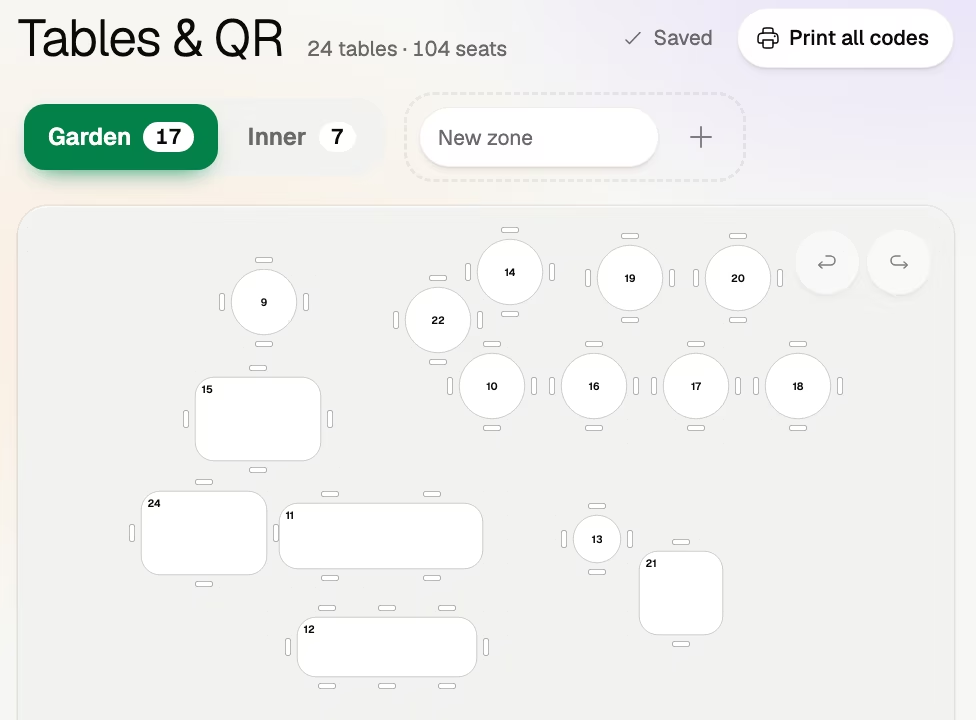
In Volio’s back office, Tables & QR is where you draw the room once and print one code per table. A table there is any numbered place you draw: a table, a stool at the bar, a sunbed. Each gets its own code, and an order arrives with that place’s number. Every plan has unlimited tables and QR codes.
Table tents, posters and table menus are made from the live menu, and the back office tells you when a printed one is out of date. Every venue starts with a card and 30 days of Pro, free. Cancel any time and the menu stays on Volio behind its QR codes, in guests’ languages, free. Paper menus are part of the Essential plan: see the plans and prices. The home page shows the back office.
Volio makes the files. It sells no hardware, so the stands, the plaques and the printing are yours to order from a print shop. Volio launched in October 2026.
Sources
Checked on 12 October 2026.
- DENSO WAVE, history, margin, module size, error correction and versions: qrcode.com/en/history, qrcode.com/en/howto/code.html, qrcode.com/en/howto/cell.html, qrcode.com/en/about/error_correction.html, qrcode.com/en/about/version.html
- DENSO WAVE, colour and overlapping pictures: qrcode.com/en/faq.html, qrcode.com/en/howto/trouble.html
- Uniqode, size: uniqode.com/qr-code-generator/for-restaurant-menu
- Square, QR code ordering: squareup.com/us/en/online-ordering/qr-code-ordering
- sunday, US pricing: sundayapp.com/pricing
- Vistaprint Australia, table tents: vistaprint.com.au
- SmartUK, QR table number: smartuk.net
- Storekit, location-based service guide: storekit.com/docs