Skip to content

Home POS

Last updated

A restaurant POS system on the tablet you already own

See how it works

Not ready to rip out your till? Volio is a restaurant POS system that runs in the browser of a tablet, phone or computer you already own, in a restaurant, a bar, a café or a food truck window. Keep the till you have, or let Volio's POS replace it. Tables and takeaway share one screen, and the money comes in three ways.

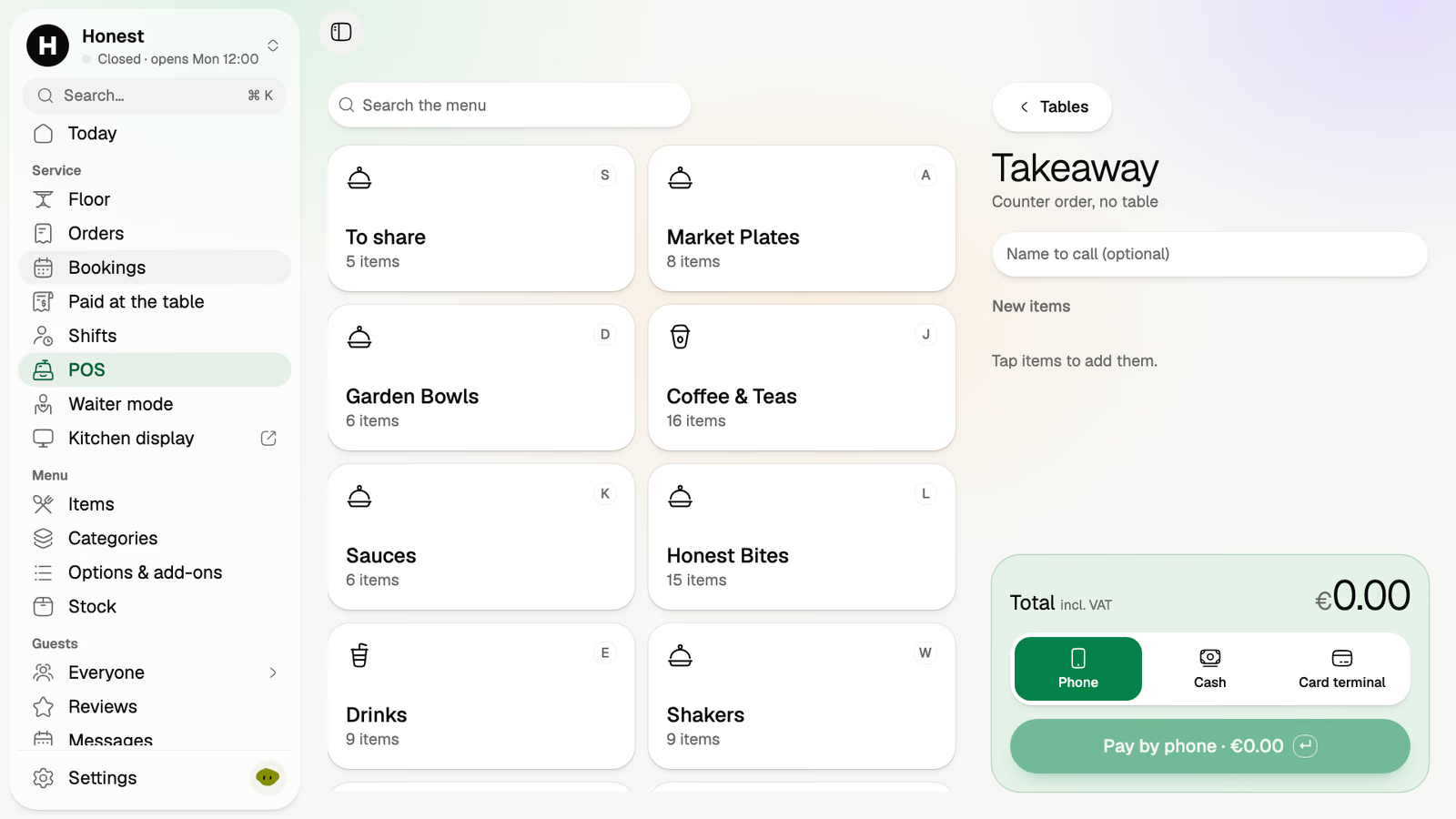
Volio's POS for the demo venue: the menu's categories as tiles, a takeaway order, and Phone, Cash and Card terminal to take the money
A real screen from Honest, Volio's demo venue. A counter order in the POS, with the menu as tiles, a name to call and the three ways to take the money.

One POS for the counter and the room

The tablet at the counter, the waiter's phone and the guest's own phone all send to the same board.

The POS

Start with table or takeaway, then tap dishes from your menu, laid out as tiles by category, with a running total. Three ways to take the money: the guest's phone, cash or your card terminal.

Start
Table or takeaway
Menu
Tiles by category
Takeaway
A name to call
Search
The whole menu
The demo venue's POS: categories such as Coffee & Teas and Garden Bowls as tiles, beside a takeaway order with a name to call

Waiter mode

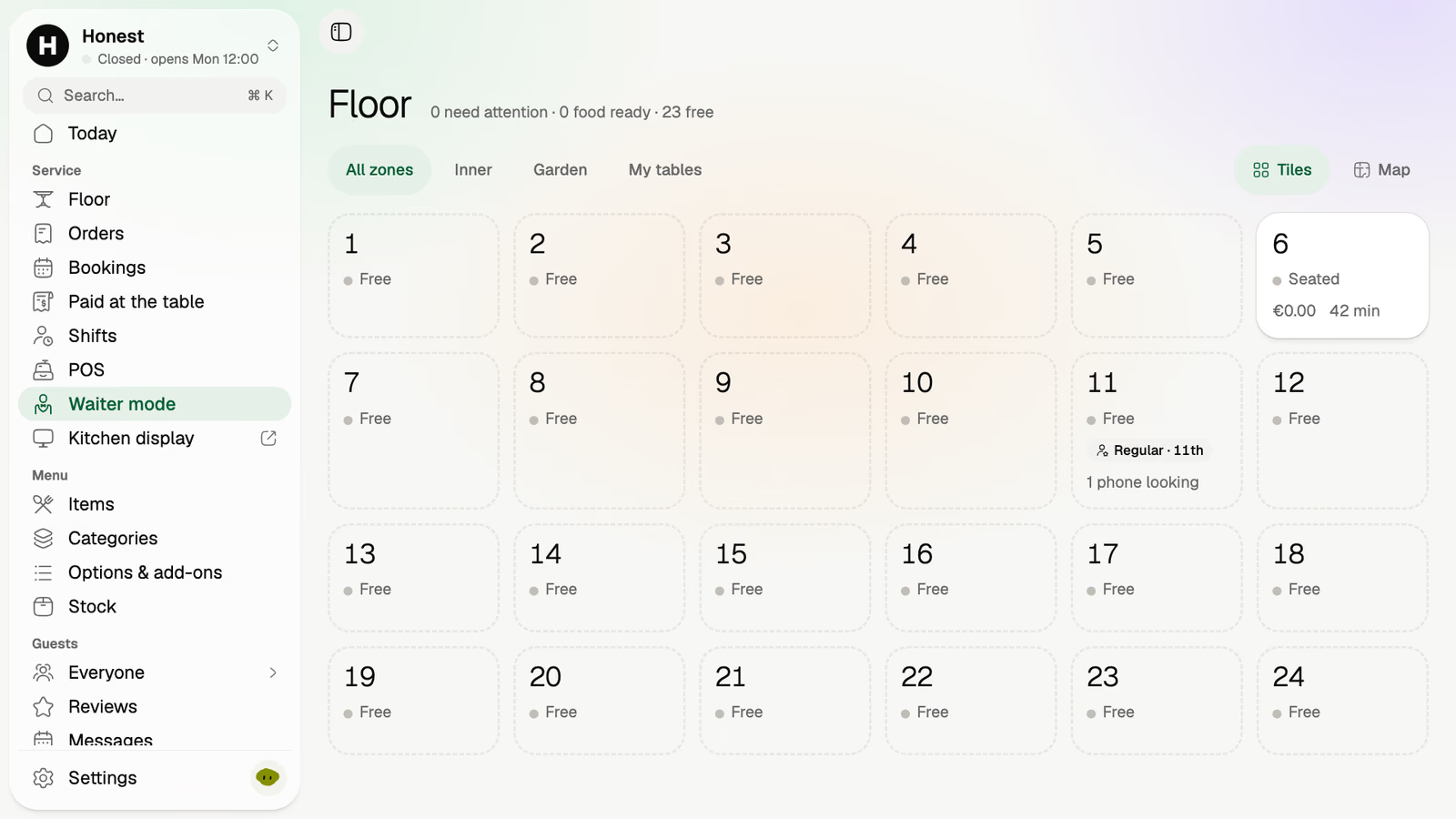
The whole room as tiles on a staff phone. Open a table, add a round and close it without walking back to the counter. Each tile says whether the table is free or seated, for how long, and what's on its tab.

Waiter mode for the demo venue: 24 tables as tiles, table 6 seated for 42 minutes

The floor

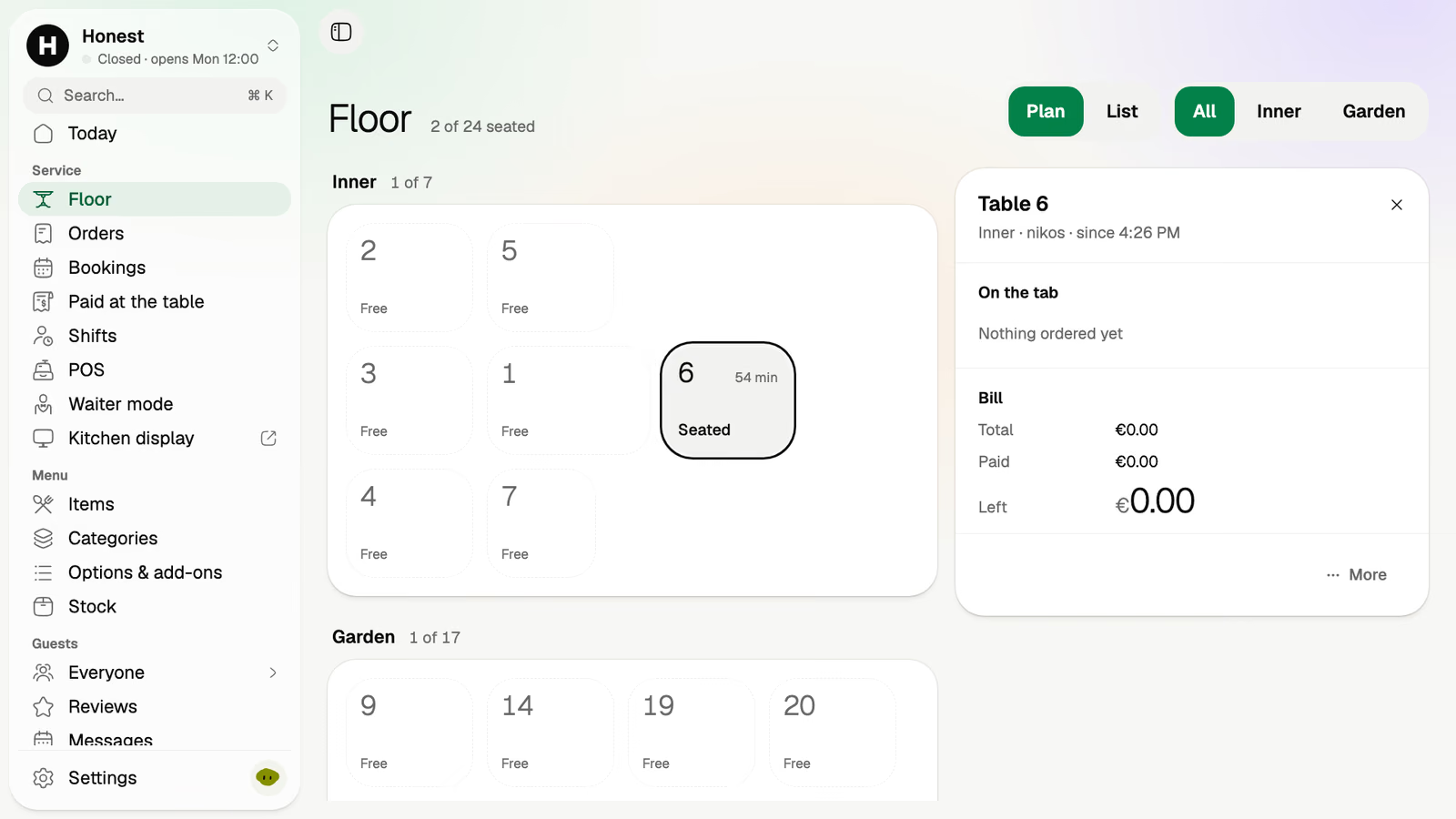
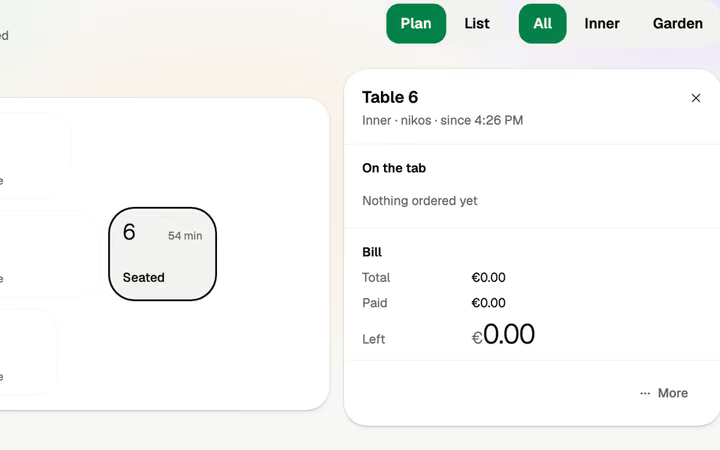
The plan you drew, live. Tap a table for its tab: who's serving it, since when, what's paid and what's left.

The demo venue's floor plan in two zones, with table 6's tab open: its waiter, the time it was seated, total, paid and left

Orders

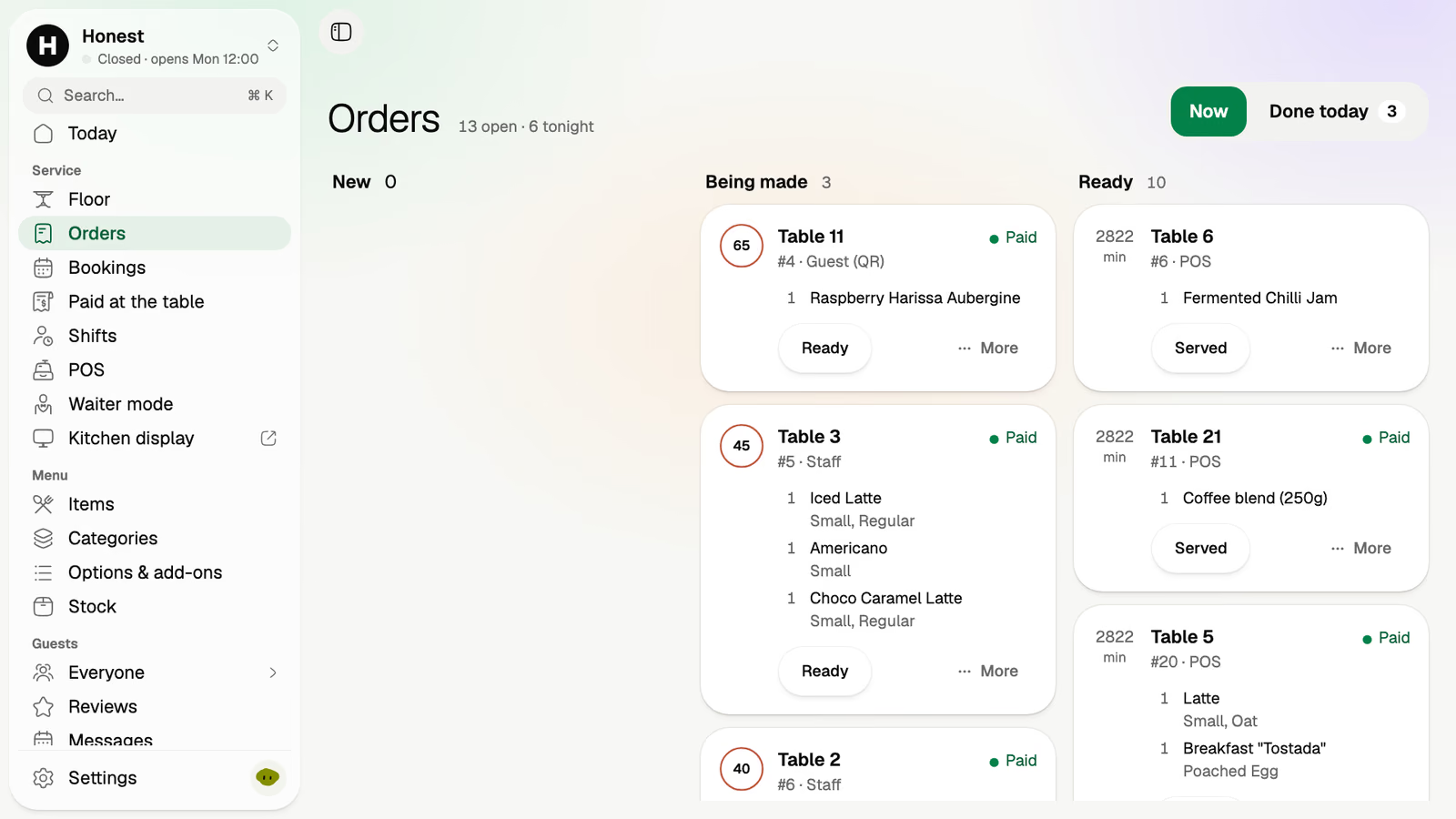
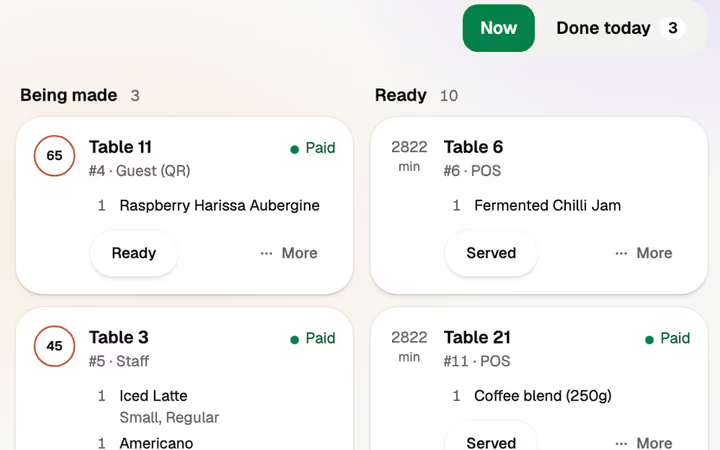
Every order in three columns, new, being made and ready. Each one says where it came from, a guest's code, staff or the POS, and whether it's paid.

The demo venue's orders board: orders from a guest's QR code, from staff and from the POS, each marked Paid

Saturday lunch on one tablet

Saturday, 13:30. A table of four, a counter order and a bill paid three ways, on one tablet. Here's the shift around it, with the tablet behind the bar and two phones on the floor.

  1. 11:45

    The only box is the tablet

    Doors open. Nothing to switch on but the tablet. The POS is a page in its browser, and waiter mode is open on two staff phones.

  2. 13:30

    Table 12, a table of four

    The waiter opens table 12 in waiter mode and sends the first round from the phone in their hand.

  3. 13:40

    A takeaway at the counter

    Counter order, no table. A name to call, three tiles, cash, and it's on the board with the table orders.

  4. 14:45

    Table 12 pays three ways

    One guest pays on their phone, one in cash, one on your card terminal. The tab counts down what's left until nothing is.

Beside your till, or instead of it

Both are real options, and you can start with the first.

  • Beside the till you have

    Guests order and pay on their phones. "Paid at the table" lists each phone payment with its table, amount and time, to enter on your till.

  • Instead of it

    Volio's POS takes the tables, the takeaway and the money. Takings by day and hour wait in the back office, with an export to Excel or CSV.

  • On what you own

    Any phone, tablet or computer with a browser. Every plan has unlimited staff, phones and screens.

What the POS doesn't do

  • It doesn't sell you hardware

    Volio sells no tills, card terminals or printers. Keep the card terminal you have. Cloud ticket printers are an option.

  • It doesn't deliver

    Takeaway means picked up at your counter, ordered there or ahead on your link. If you live on delivery, look elsewhere.

Every plan starts with 30 days of Pro, free.

Card needed · cancel any time
  1. Day 1Every Pro feature, unlocked, nothing to pay
  2. Day 24We email you what's coming, and how to cancel
  3. Day 31Your plan starts, at the price you picked. Cancel before and you pay nothing
Basic

Monthlya monthRegular price from Jan 1, 2027: €49€39

Yearly 2 months freeRegular price from Jan 1, 2027: €40.83€32.50 a monthRegular price from Jan 1, 2027: €490€390

Take orders and payments

  • Digital menu with photos and allergens
  • Menu in each guest's language (translated by machine, import from photos)
  • Guests order from the table
  • Guests pay and split from their phone
  • Takeaway and pickup orders
  • POS at the counter
  • Waiter mode on staff phones
  • Kitchen display
  • Sales reports and end of day
Essential

Monthlya monthRegular price from Jan 1, 2027: €109€89

Yearly 2 months freeRegular price from Jan 1, 2027: €90.83€74.17 a monthRegular price from Jan 1, 2027: €1,090€890

Bring guests back

Everything in Basic, and:

  • Kitchen and bar routing (several screens, printers)
  • Online bookings with deposits (tables, sunbeds, services)
  • Guest profiles (visits, spend, allergies, notes)
  • Loyalty points and regulars' perks
  • Gift cards and treat a friend
  • Happy hours and promo codes
  • Campaigns and automations (birthday, win-back)
  • Reviews and feedback
  • Paper menus printed from your live menu, and a note when one is out of date
Pro

Monthlya monthRegular price from Jan 1, 2027: €259€209

Yearly 2 months freeRegular price from Jan 1, 2027: €215.83€174.17 a monthRegular price from Jan 1, 2027: €2,590€2,090

Run it at scale

Everything in Essential, and:

  • Stock and recipes
  • Shifts: the rota with the forecast on it, the till clock and live labour %
  • Manager approvals and audit log
  • Advanced analytics and exports
  • Several venues in one account
  • Integrations and API
  • Self-order kiosk on your own tablet
  • Menu boards on your TVs, following the menu
  • Priority support and onboarding call

Founding price for the first 500 venues, locked for 24 months. New venues pay the struck price from Jan 1, 2027.

Cancel any time: your QR menu stays online, free. Ordering, payments and the rest stop until you pick a plan again.

Unlimited tables, staff and screens on every plan. Pay yearly and 2 months are free; closed for part of the year? Monthly stops any month you like.

Essential

How do you want to pay?

Questions owners ask

Something else? hello@usevolio.com

Do I need to buy a till or a tablet?

No. Volio sells no hardware and needs none. The POS runs in the browser of a phone, tablet or computer you already own. Cloud ticket printers are an option.

Can I keep my current till?

Yes. Guests order and pay on their phones, and "Paid at the table" lists each phone payment with its table, amount and time, to enter on your till. Or let Volio's POS replace it.

How do I take card payments?

Three ways. The guest pays on their own phone with Apple Pay, Google Pay or card. Or they pay cash. Or you take the card on the terminal you already have.

Can waiters take orders on their own phones?

Yes. Waiter mode shows the room as tiles on a staff phone. Open a table, add a round, close it, all from the floor.

Does it handle takeaway at the counter?

Yes. Start a takeaway order, add a name to call, tap the dishes and take the money. It joins the same orders board and kitchen display as the tables.

Does it work in a bar or a food truck?

Yes. A bar or a club runs its tables, booths and stools on the floor and in waiter mode. A food truck runs the POS on a tablet in the window. Volio doesn't deliver.

Can I see what the POS sold?

Yes. Takings by day and hour, items and best sellers are in the back office, with an export to Excel or CSV.

Is there a limit on staff or devices?

No. Every plan has unlimited tables, staff, phones, screens, QR codes and languages.

Which plan has the POS?

Every paid plan has the POS, waiter mode and the kitchen display. See the plans and prices on this page.

A POS on the tablet you already own

See how it works