Volio
VolioKitchen display system cost: screens and fees
A kitchen display costs a screen plus software, often charged per device: $20 to $30 a month at Square. What to budget, and when a tablet will do.
A kitchen display has two costs: the screen, which can be a tablet you already own, and the software, which several vendors charge per device per month. As of October 2026 Square charges $30 per device a month on its Plus plan and $20 on Premium, Lightspeed charges $30 per screen, and Loyverse charges nothing. A kitchen and a bar are two devices, so ask for the price of the second screen before the first.
If you are still deciding whether you want one at all, start with what a kitchen display does. This post is only about the money.
The two costs: the screen and the software
The screen is a one-off. It is either a device you own, a tablet you buy, or a kitchen-grade touchscreen from the vendor.
The software is monthly, and this is where quotes differ. Loyverse’s kitchen app is free and MENU TIGER includes one from its Advanced plan. Square, Lightspeed and SumUp charge per device, on top of a plan you must already have. TouchBistro and Toast sell it with their own screens.
What vendors charge per screen
Each row is from the vendor’s own page as of October 2026, in the currency published.
| Vendor | Kitchen screen software | You also pay | The screen |
|---|---|---|---|
| Square (US) | $30 per device a month on Plus, $20 on Premium; not on Free | The plan: $49 or $149 per location a month | Android devices; kitchen touchscreens in Square’s shop are $699 to $899 |
| Lightspeed (US page) | $30 per screen a month | A plan at 69, 189 or 399 USD; no billing period shown | Sold by quote |
| SumUp (UK) | £19 per terminal a month | Point of Sale Pro, £49 a month excl. VAT | Not on its pricing page |
| MENU TIGER | Included from the Advanced plan | $46 a month for that plan | Not on its pricing page |
| Loyverse | Free | Nothing; the POS is free too | An iPad or Android tablet, 10 inches recommended |
| TouchBistro | An add-on, priced by quote | POS “starting at” $69 a month; hardware is extra | Touchscreens bought through TouchBistro; “installation fees will apply” |
| Toast (US) | By quote: “Toast KDS pricing is customized to your kitchen’s layout and order volume” | Hardware and implementation costs that “vary” | Approved Toast hardware only |
Read the second column with the third. A $20 screen that needs a $149 plan is a different purchase from a free screen on a free POS.
The paid options give something for the price. Square, Lightspeed, TouchBistro and Toast sell touchscreens made for a kitchen. TouchBistro says its “offline mode ensures your TouchBistro KDS will continue working even when your internet is temporarily unavailable”, and Lightspeed and Toast each list an offline mode on their pricing pages. On your own tablet, the screen is your choice and the offline question is yours to ask.
Will a tablet or a TV do
Often, yes, if the software allows it. Square’s kitchen app runs on Android devices, and Loyverse’s runs on an iPad or an Android tablet, with a 7-inch minimum and 10 inches recommended, in landscape. TouchBistro and Toast require their own screens.
A tablet is fine for one station. A TV is easier to read from across the pass, but most TVs are not touchscreens, so decide how the cook will mark a ticket done before you mount one.
Four checks before a consumer device goes on the kitchen wall:
- Heat and grease. Keep it away from the fryer and the grill, above the splash line, in a case you can wipe. Lightspeed describes its kitchen screen as “Built to withstand steam, heat and water”. The maker of an ordinary tablet promises no such thing.
- Height. Mount it at eye level where the cook already looks, usually where the ticket rail was. Nobody should bend or turn around to read it.
- Sound. A new ticket needs a sound the line can hear over the extraction fan. Test it during service, with the fans on.
- Power. A charger that stays plugged in, a cable clipped out of reach, and auto-lock switched off. On an iPad, Guided Access keeps the device on one app.
Then test the Wi-Fi at the pass. Steel and thick walls are hard on a signal, and a screen that loses the network shows nothing new.
Extras: mounts, bump bars, printers
Mounts. Square’s wall mount for its kitchen touchscreens is $99. For your own tablet, any enclosure that bolts to the wall and takes a cable will do.
Bump bars. A bump bar is a keypad that clears tickets without anyone touching the screen with wet hands. TouchBistro lists one as optional. None of the pages read for this post gives a price for one, so ask.
Printers. Some kitchens keep paper as the backup. Lightspeed lists an Epson kitchen printer among its hardware, sold by quote. MENU TIGER has a printing and order management add-on at $20 a month.
Installation. TouchBistro says installation fees apply to its kitchen display. Ask any vendor that supplies the screen for that fee in writing.
A kitchen and a bar: the bill for two screens
Two stations, one for food and one for drinks, at the prices published in October 2026:
- Square Plus: $49 plus two screens at $30 is $109 a month. The kitchen software alone is $720 a year.
- Square Premium: $149 plus two screens at $20 is $189 a month.
- Lightspeed: $60 a month for the two screens, on top of the plan.
- SumUp (UK): £49 plus two at £19 is £87 a month excl. VAT.
- Loyverse: nothing for the two screens.
If you buy the screens from Square, two of the smallest kitchen touchscreens in its shop are $1,398. On two tablets you already own, the hardware line is two wall mounts.
Add an expo screen at the pass and every per-device line goes up by half, so get the price of screen number three in the first quote. The full POS bill puts this line next to the others, and a POS on devices you own keeps the hardware line small.
What Volio includes
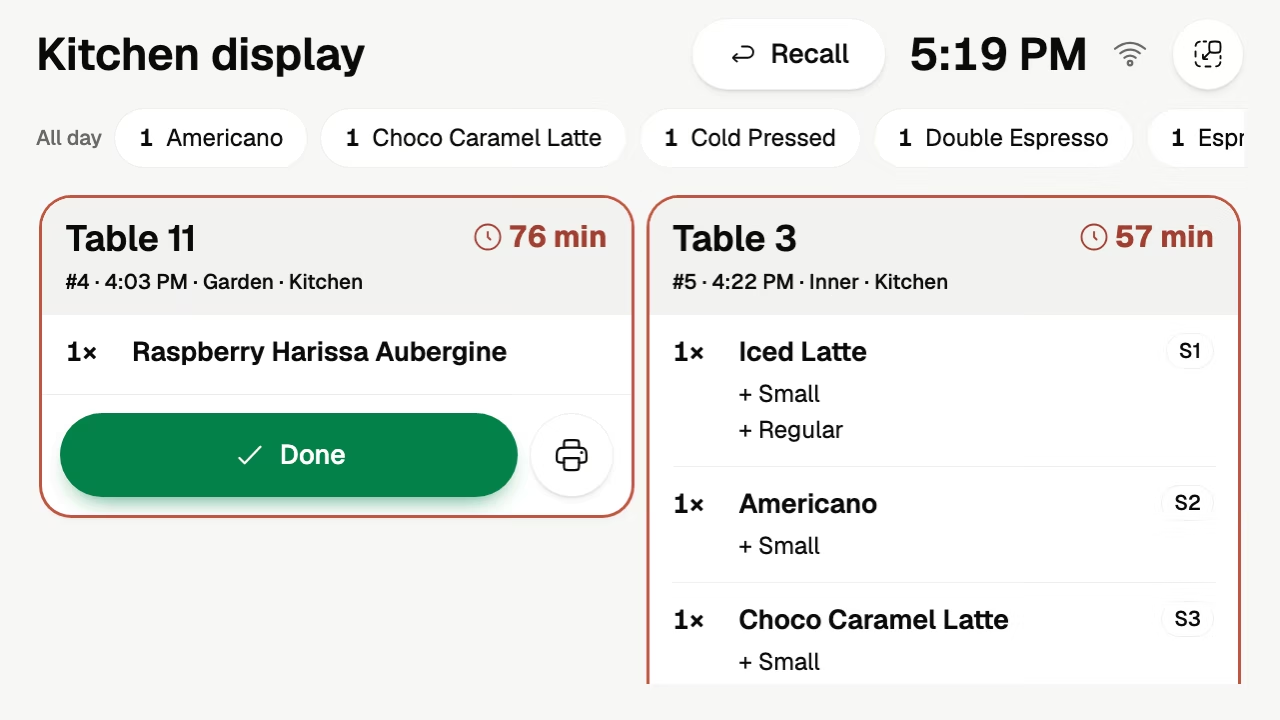
Volio’s kitchen display runs in the browser on a tablet or computer the venue already owns. Tickets come in by table with a timer, a Done button, Recall and a running count per item. The kitchen screen is in every plan, and every plan has unlimited screens, so a second or third one changes nothing on the bill (see the plans and prices).
One thing is not in the Basic plan. Sending each dish to the place that makes it, food to the kitchen and drinks to the bar, comes with the Essential plan. Cloud ticket printers are an option if you want paper. The team side shows the kitchen display with the floor and the POS.
Volio sells no hardware, so the screen, the mount and the case are yours to buy, and it promises no offline mode. If you want a kitchen-grade screen supplied and installed, or a kitchen that keeps running with the internet down, choose a vendor that publishes both. Volio launched in October 2026.
Sources
Checked on 12 October 2026.
- Square KDS: squareup.com/us/en/point-of-sale/restaurants/kitchen-display-system
- Square, restaurant plans: squareup.com/us/en/point-of-sale/restaurants/pricing
- Square Shop, kitchen touchscreens: 10.1 inch, 15.6 inch, 21.5 inch, wall mount
- Lightspeed Restaurant, pricing: lightspeedhq.com/pos/restaurant/pricing
- Lightspeed Restaurant, hardware: lightspeedhq.com/pos/restaurant/hardware
- SumUp Point of Sale Pro, pricing: sumup.com/en-gb/point-of-sale-overview/pos-pro/pricing
- MENU TIGER, pricing: menutiger.com/pricing
- Loyverse, pricing: loyverse.com/pricing
- Loyverse Kitchen Display: loyverse.com/kitchen-display-system
- TouchBistro, pricing: touchbistro.com/pricing
- TouchBistro, kitchen display: touchbistro.com/kitchen-display-system
- Toast, pricing: pos.toasttab.com/pricing
- Toast, kitchen display: pos.toasttab.com/hardware/kitchen-display-system
- Apple, Guided Access: support.apple.com/en-us/111795